
Game Engines (Unity / Unreal)
Generate props and character drafts, inspect their silhouette and collisions, and use clean GLB/OBJ exports directly in level design.
Generate and inspect 3D models in your browser, then export to GLB, OBJ, or STL.
Try examples
⚡ Instant 3D Sample PreviewWaiting to generate 3D model
Unlock Pro-quality assets
High-poly meshes & 4K PBR textures
Enable medium/high mesh density and HD textures with a Pro plan.
Upgrade to ProFrom a clear reference to an inspectable 3D asset
Marble 3D AI provides a production-ready image-to-3D browser workflow. Upload a clear reference image, or provide several views when shape consistency matters. The generator builds a draft with geometry and materials that you can inspect before continuing.
Presets, a single image, or multiple reference views
Test curated production 3D assets instantly without signing in, and inspect real-time 360° geometry and materials.
Upload a centered subject with a clear silhouette and simple background for a stronger starting point.
Add consistent front, back, left, and right views when side details and proportions matter.
Browse characters, props, vehicles, and scenes generated from different references. Select an example to load a related prompt, then make it your own.
Compare the clay view with the textured result before you continue. Check the silhouette from several angles, look for thin or floating parts, and inspect where surfaces meet. Material detail can make a model look finished even when the mesh still needs work.
Buying Paths
Start with a small credit pack or choose a subscription based on how often you generate. Compare monthly credits, concurrent tasks, processing speed, and available GLB, OBJ, and STL exports before choosing a plan.
Sign up and get 18 free credits instantly — enough to generate 3 Trellis 3D models (6 credits each).
Includes
Everything in Basic, plus
Everything in Plus, plus
Different 3D tasks demand distinct mathematical architectures. Instead of forcing all assets through one generic black-box generator, Marble 3D AI brings together the industry’s three most specialized models under a single high-performance workbench.

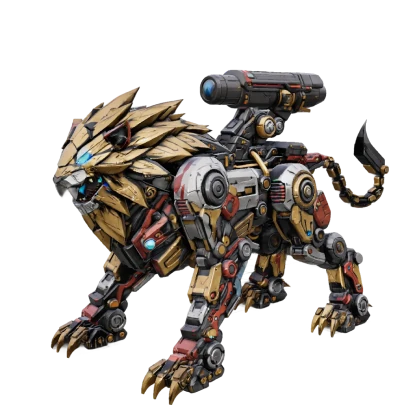
The Benchmark for Everyday Realism & Natural Textures
Built for versatile 3D asset generation with rich surface details and physical light interaction. Ideal for props, vehicles, environments, and architectural concepts.
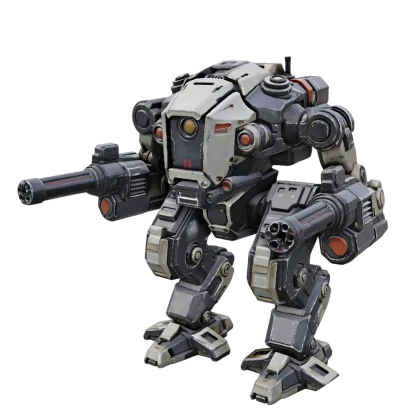

Structural Latent Geometry for Hard Surfaces & Mechs
Engineered with structured latent representations to preserve straight edges, geometric planes, and mechanical symmetry. Zero mesh melting—perfect for tools, gadgets, furniture, and 3D print slicing.

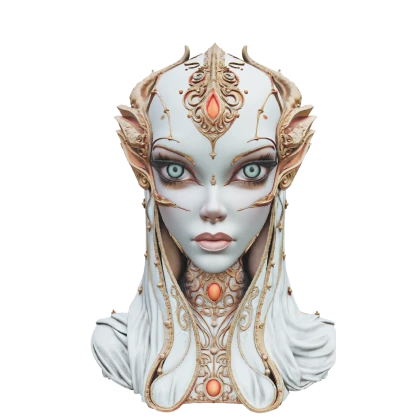
The Gold Standard for Realistic Faces, Hair & Avatars
Trained specifically for human anatomy, detailed facial features, micro hair strands, and garment drape physics. The undisputed benchmark for game characters, virtual avatars, and collectible figurines.
Raw generative meshes are often filled with messy triangles and unseparated parts. Marble 3D AI includes native post-processing tools to prepare your models for Blender, game engines, and CAD software.
Reconstructs chaotic AI triangular meshes into uniform, clean quad edge loops. Eliminates rendering artifacts and ghost collisions in Unity, Unreal Engine, and Blender with optimized vertex budgets.


Automatically decomposes a monolithic 3D model into logically separated, animatable sub-components (wheels, chassis, doors, limbs, accessories) for isolated editing, texturing, and rigging.

| Model | Target Specialty | Mesh Topology | PBR Shading | Print-Ready STL | Best Suited For |
|---|---|---|---|---|---|
| Tencent Hunyuan 3.1 | Everyday Realism | Up to 1.5M Polygons | Full PBR (Roughness/Metal) | Supported | Props, Vehicles, Everyday Assets |
| Microsoft Trellis 2 | Hard-Surface & Machinery | Watertight Manifold | Specular & Texture | Optimized (Zero Distortion) | Mechanical Parts, Furniture, 3D Printing |
| Hyper3D Rodin Gen-2 | Characters & Avatars | Organic High-Density | Subsurface & 4K Textures | Supported (Miniatures) | Game Characters, Avatars, Figurines |
Downstream Workflows
Export high-fidelity assets directly into your production pipeline. Choose the format and model suited for your next step.
Generate props and character drafts, inspect their silhouette and collisions, and use clean GLB/OBJ exports directly in level design.
Leverage Trellis 2 for non-deforming mechanical parts and watertight STL exports ready for slicer software.
Use generated meshes as high-quality concept bases for retopology, sub-d sculpting, and character look development.
Quickly explore physical proportions and product styling from reference photos before committing to precision CAD modeling.
A texture map can make a model look complete before its underlying geometry is verified. Always rotate the clay view first to examine edges, floating artifacts, and surface intersections.
Select the right engine for the job: choose Trellis for mechanical items that need sharp edges, Rodin for figures and faces, and Hunyuan for versatile everyday props.
GLB is ideal for lightweight web preview and engines, OBJ provides universal 3D app compatibility, and STL is standard for slicing and physical manufacturing.
Frequently Asked Questions
Marble 3D AI is a browser-based AI 3D model generator for turning text prompts, single images, or multiple reference views into inspectable model drafts. It combines input, generation controls, preview, account credits, and export options in one workflow.
Yes. Use text when you want to explore an idea quickly, a single image when you already have a strong visual reference, or multi-view images when the object's side and back shapes matter.
Use a sharp, well-lit image with one clearly visible subject and a simple background. Avoid severe cropping, motion blur, strong reflections, and objects hidden behind other elements. For multi-view generation, keep the same object, scale, and orientation consistent across every reference.
The current plans list GLB, OBJ, and STL workflows. GLB is convenient for compact web and real-time previews, OBJ is widely supported in 3D tools, and STL is commonly used for printing workflows. Available exports can depend on the selected generation mode or plan.
You can explore the generator and prepare an input before signing in. Processing, credit usage, saved assets, and some exports may require an account or eligible plan.
Treat every generated model as a draft that should be checked for its final use. Review silhouette, topology, UVs, textures, scale, collisions, and print geometry as applicable.
Start with a single image or text prompt. Test Hunyuan, Trellis, or Rodin in seconds and export physics-ready 3D assets.